


Stock and Inventory Online
4.7153.00 Reviews
App Specs
- Version
- 1.0.47r11
- Updated On
- License
- Free
- Downloads
- 100,000+
- Developer
- Chester Software (Xaltos Technologies Ltd)
- Categories
- Business
- Platform
- Android
Screenshots
 Analysis by AppCompare
For a small business, stock problems rarely arrive as one big crisis. They build up through little interruptions: checking a shelf twice, messaging a colleague to ask whether an item was sold, or discovering that the count in a notebook no longer matches what is actually there. I find Stock and Inventory Online most interesting as a way to reduce that everyday back-and-forth. It is a free business app from Chester Software, part of Xaltos Technologies Ltd, designed for people who need to keep inventory accessible across more than one device or user.
That shared-work angle is the main reason I would consider it over a basic personal stock tracker. A single-user spreadsheet can be perfectly adequate when one person handles every purchase and sale, but it becomes awkward once staff take turns receiving goods or serving customers. A shared inventory tool can give everyone a common reference point, provided the team agrees to record changes consistently. The app has a 4.7 average from around 6,200 ratings, and has passed 100,000 installs; those figures suggest it has found an audience, though they cannot tell you whether its workflow suits your particular shop.
Where the repeated stock-checking stops
The practical benefit is not simply having a digital list. It is reducing the number of times someone has to stop work to ask what is available. Picture a small store where one person is helping a customer while another is unpacking a delivery. If both rely on the same inventory record, the person at the counter can check the item rather than leave the customer and walk to the stockroom. That is a modest time saving, but it matters when the same interruption happens all day.
There is a trade-off: a shared record is only useful when updates happen promptly. If staff keep making mental notes and enter them at the end of a shift, the app may show a tidy but outdated picture. I would treat it as part of the handover routine, not as a substitute for one. When goods arrive, record them then; when stock is used or sold, make the adjustment while the details are still clear. That habit is more important than adding every possible field at the outset.
A sensible first setup
I would begin with the items that cause the most trouble rather than trying to catalogue the entire business in one sitting. Start with stock that is expensive, frequently requested, easy to confuse with a similar product, or prone to running out. Give those entries names that make sense to the whole team, then agree how everyone will describe variations such as size or colour. A consistent naming habit prevents near-duplicate entries from becoming a problem later.
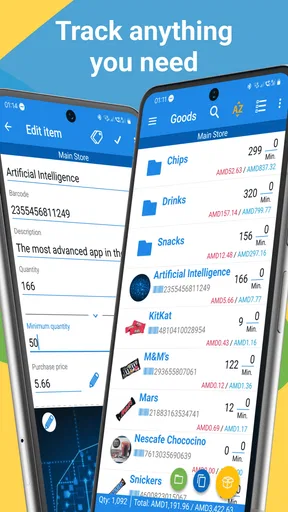
Once the core list is reliable, categories and custom fields can reflect the way the business actually works. The temptation is to add fields for every detail that might someday be useful. I would resist that. A field earns its place when someone uses it to identify, count, reorder, or compare an item; otherwise it adds another thing to fill in during a busy moment. Alerts for low stock are most helpful after the team has settled on sensible thresholds, not while counts are still being corrected.
The app is free to install, rated for Everyone, and its current version is 1.0.46r18, with Android 5.0 as the minimum operating system. In-app purchases range from $9.99 to $999.99 per item, so I would check the available options against the way I plan to use it before making a long-term commitment. The wide range makes it especially worth confirming which capabilities are included at no cost and which, if any, require a purchase for your workflow.
Worth Reading Before You Choose

Flipboard Shows What News Apps Must Do Beyond the Feed

Switching to Android Auto Means Rethinking Your Driving Routine

Google Calendar Makes a Crowded Week Easier to Manage

Ludo King Makes the Most of the Minutes Between Plans

Baby Panda World Brings Quick Play to Modern Phones, but Its Game Library Feels Busy

ESPN’s Live Game View Makes Following Close Games Easier
Simplifying Your Inventory Management
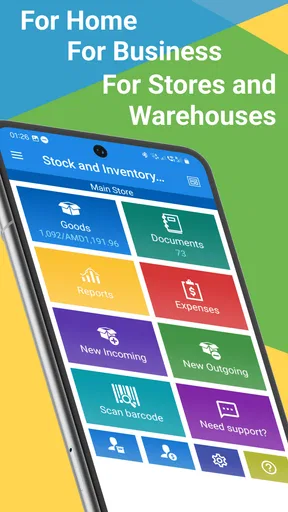
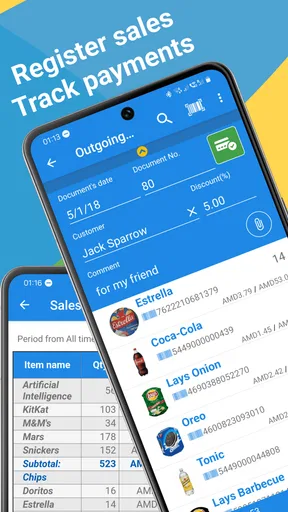
First things first, let's talk about the user interface. It's clean, intuitive, and doesn't make you feel like you need a degree in rocket science to figure it out. From the moment you open the app, it’s like the creators knew exactly what you needed before you did. The dashboard provides a comprehensive overview, allowing you to manage your inventory with ease.
One of the standout features is the real-time syncing across devices. Imagine updating your stock levels on your phone and having it immediately reflected on your tablet. It’s like magic, but real! This feature is a game-changer, especially if you have multiple team members accessing the inventory simultaneously.
Features That Make Life Easier
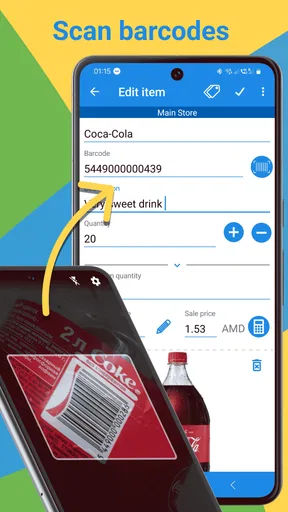
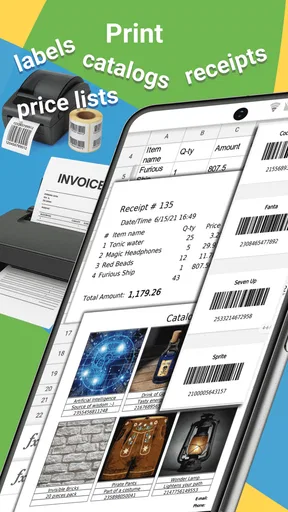
Now, let’s dive into the nitty-gritty of what Stock and Inventory Online offers. From barcode scanning to detailed reporting, this app has you covered. The barcode scanner is super slick. You just point, scan, and boom—your inventory is updated. It’s almost too easy.
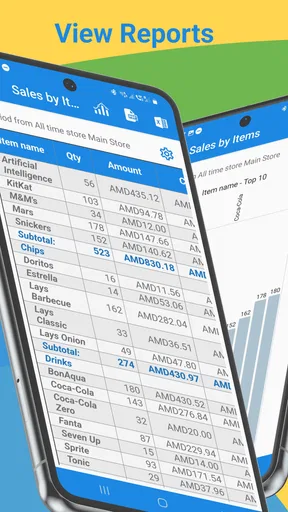
Plus, the app allows you to generate detailed reports. You can see what’s selling like hotcakes and what’s gathering dust on the shelves. This insight is invaluable for making informed decisions about your stock levels and understanding customer preferences.
Customization and Flexibility
One of the best things about this app is its flexibility. It doesn’t box you into a one-size-fits-all solution. You can customize categories, add custom fields, and even set up alerts for low stock levels. It's like building your own personal inventory assistant.
Additionally, the app supports multiple currencies and units of measurement, which is a huge plus if you're dealing with international suppliers or customers. This flexibility ensures that no matter how unique your business needs are, the app can adapt accordingly.
Making shared updates dependable
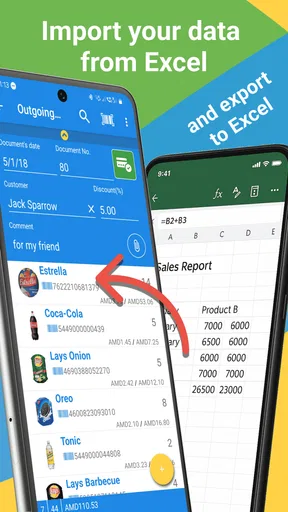
For a team, I would decide in advance who is responsible for recording each kind of change. For instance, the person receiving a delivery can enter the incoming quantity, while the person who notices damaged or missing stock can flag the discrepancy for whoever maintains the count. This avoids the common trap of assuming that “someone else” has already updated the record. The app can bring people onto a shared inventory, but clear ownership is what makes the numbers dependable.
Barcode scanning can also help with a practical accuracy problem: products with similar names. Before relying on scanning as the normal routine, I would test a few representative items and make sure the right product is being selected each time. A barcode is useful only when it maps cleanly to the item in the list. For products without a convenient barcode, a deliberate search and a consistent naming scheme may be quicker than trying to force every item into the same process.
Reports are best used as prompts for a decision, not as decisions on their own. A slow-moving item might be seasonal, recently restocked, or simply recorded under a different name. I would use the report to choose what to inspect, then compare it with what is physically on the shelf before changing purchasing plans. That small reality check helps prevent a tidy-looking report from encouraging an unnecessary reorder or an overly aggressive cut.
Security and Support
When it comes to handling your business data, security is paramount. Fortunately, Stock and Inventory Online takes this seriously. All your data is backed up and encrypted, giving you peace of mind that your information is safe from prying eyes.
If you ever hit a snag or have a question, the support team is just a click away. They’re responsive, helpful, and genuinely seem to care about making your experience as seamless as possible.
Where it fits—and where it may not
I see this as a better fit for a small team that needs a shared stock reference than for someone who only wants a private list of belongings. If you are the sole person tracking a handful of products, a basic spreadsheet may be faster to set up and easier to adapt without learning a dedicated inventory workflow. On the other hand, spreadsheets can become fragile when several people edit separate copies or use different naming conventions. A shared app is appealing when avoiding those mismatches is worth the effort of keeping one common record current.
It is also not automatically a replacement for a full business-management or point-of-sale system. If inventory needs to be tightly connected to checkout, accounting, purchasing approvals, or a complex chain of locations, I would compare those requirements carefully before moving everything into a simpler stock-focused tool. The useful question is not whether an app has many features, but whether it covers the steps your staff actually perform without creating duplicate work. For a straightforward operation, a lighter tool can be easier to maintain; for tightly integrated operations, a broader system may be the better choice.
A realistic routine might look like this: before opening, a staff member checks the shared stock record for a fast-selling item; after a delivery, the receiving person updates the count; later, the owner reviews reports to spot items that deserve a closer look. The benefit comes from these small actions being visible to the next person, rather than from a dramatic overhaul of the business. I would start with one repeatable routine, see whether it saves interruptions, and only then expand the inventory process.
Wrapping It Up
So, is Stock and Inventory Online worth a shot? Absolutely. It’s a powerhouse of an app that takes the hassle out of inventory management. With its user-friendly interface, robust features, and excellent support, it’s a must-have tool for anyone looking to streamline their business operations.
Whether you're a seasoned pro or just dipping your toes into the world of inventory management, this app has something to offer. So go ahead, give it a whirl, and watch your inventory headaches disappear!
My recommendation is more measured: try it when the recurring cost of checking, asking, and reconciling stock is beginning to outweigh the effort of maintaining a shared list. The app’s multi-user, multi-device approach is the point to test first, not a reason to assume every process will become automatic. I would judge it after the team has used the same naming and update habits through an ordinary workweek, including a delivery and a busy period. If the shared count is easier to trust and staff spend less time chasing answers, it is doing useful work. If updates keep getting postponed or the business needs deeper links to other systems, a different solution may serve you better.
Pros
- User-friendly interface simplifies tracking.
- Real-time updates enhance decision-making.
- Customizable alerts for stock levels.
- Supports multiple warehouses efficiently.
- Seamless integration with popular platforms.
Cons
- Limited offline functionality may hinder use.
- Advanced features locked behind paywall.
- Occasional sync issues reported by users.
- Requires stable internet for optimal performance.
- Initial setup can be time-consuming.
FAQs for Stock and Inventory Online
What features does Stock and Inventory Online offer?
Stock and Inventory Online provides a comprehensive set of tools to manage your inventory efficiently. Key features include real-time stock tracking, supplier management, automated restock alerts, and reporting tools. The app also supports barcode scanning and integrates seamlessly with various eCommerce platforms, making it suitable for businesses of all sizes.
Is Stock and Inventory Online suitable for small businesses?
Absolutely! Stock and Inventory Online is designed to cater to businesses of all sizes, including small businesses. Its user-friendly interface and customizable features make it easy for small business owners to manage their inventory without the need for extensive technical knowledge. The app's scalability also ensures it can grow with your business.
Does the app require an internet connection to function?
While Stock and Inventory Online is optimized for online use to provide real-time updates, it also offers offline functionality. You can continue to access and update your inventory data without an internet connection, and any changes will sync automatically once you’re back online, ensuring uninterrupted service.
Are there any costs associated with using Stock and Inventory Online?
Stock and Inventory Online offers a free basic version with limited features. However, for businesses that require more advanced tools and integrations, there are paid subscription plans available. These plans vary in price and features, allowing you to choose one that best fits your business needs and budget.
How secure is my data with Stock and Inventory Online?
Data security is a top priority for Stock and Inventory Online. The app employs advanced encryption protocols to protect your data. Regular updates and security patches ensure that your information remains secure against potential threats. Additionally, the app offers user permissions settings to control access within your team.


